Prerequisites
Complete every check before installation.
1. Select supported versions
Use one row from the release matrix. This guide's recorded
Kubernetes baseline is 1.35 with Helm 3.11.2 or later. Use another Kubernetes or
OpenShift version only when the product release notes explicitly support it.
2. Install client tools
Required: Bash, kubectl, Helm 3, and docker. Run all command blocks for one installation in the same Bash session. (Automation-specific pipeline tools such as envsubst, curl, openssl, and base64 are documented in the Agentic reference.)
set -euo pipefail
kubectl version --client
helm version --short
docker version --format '{{.Client.Version}}'
kubectl cluster-info
All commands must succeed. Confirm the server version returned by kubectl version
matches the selected release.
3. Check permissions
Set one namespace for the baseline installation:
export NAMESPACE=graph-platform
export REGISTRY_SECRET=graph-artifacts # Required template contract

kubectl auth can-i create namespaces
kubectl auth can-i create customresourcedefinitions.apiextensions.k8s.io
kubectl auth can-i create clusterroles.rbac.authorization.k8s.io
kubectl auth can-i create deployments.apps --namespace "${NAMESPACE}"
kubectl auth can-i create statefulsets.apps --namespace "${NAMESPACE}"
kubectl auth can-i create secrets --namespace "${NAMESPACE}"
kubectl auth can-i create persistentvolumeclaims --namespace "${NAMESPACE}"
Each result must be yes. A platform administrator must perform cluster-scoped steps
when your account does not have those permissions.
4. Prepare registry access
Graph images and Helm charts require authentication to artifacts.altair.com. If you do not yet have an account, request access through your Siemens account or support contact.
Create a personal identity token in Artifactory. You use this token as the password for the registry logins below:
- Sign in to the Artifactory UI at https://artifacts.altair.com/ui/.
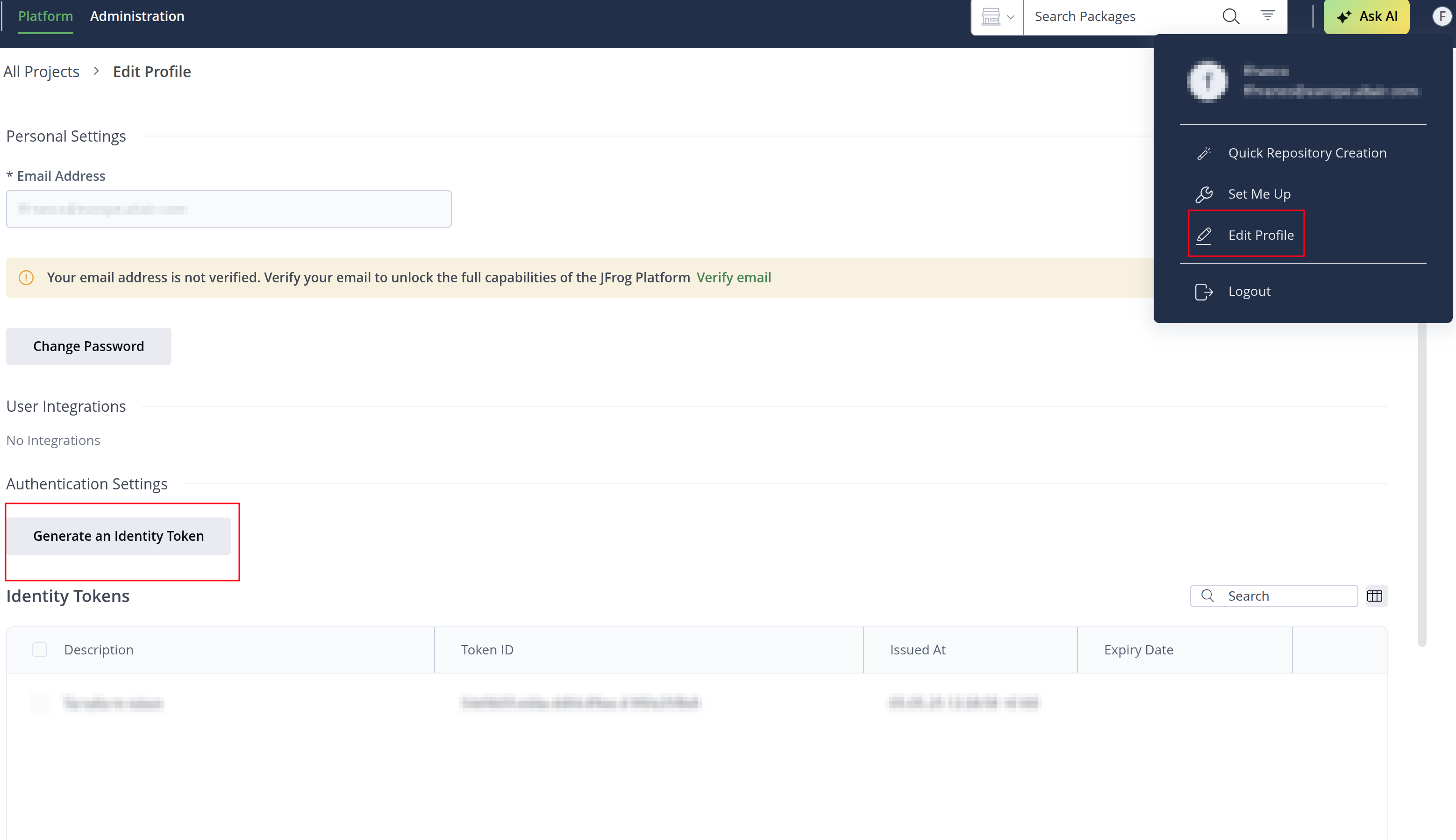
- Open your user menu (top-right corner) and select Edit Profile.
- Under Authentication Settings, select Generate an Identity Token.
- Copy the token immediately and store it in your approved secret manager. Artifactory does not show the token again.
Never place raw tokens in source control or command arguments.
Log in interactively to the container and Helm registries. Enter your Artifactory username and paste the identity token when prompted for the password:
docker login artifacts.altair.com --username "<username>"
helm registry login artifacts.altair.com --username "<username>"
Create the target namespace and provision the namespace-local image pull Secret named graph-artifacts (expected by all provided templates) through your organization's approved secret-manager or Kubernetes process:
kubectl create namespace graph-platform
Provision graph-artifacts in graph-platform using your approved secret-manager workflow (or interactive credential store) so the Secret is created with type kubernetes.io/dockerconfigjson.
Verify that the Secret exists and has type kubernetes.io/dockerconfigjson:
kubectl get secret graph-artifacts --namespace graph-platform
Kubernetes Secrets are namespace-scoped. If workloads run in a different namespace from the operator, create the graph-artifacts Secret in each target namespace. For secure non-interactive pull Secret generation and CI/CD mechanics, see Agentic reference and Template and secret contract.
5. Prepare production inputs
| Input | Requirement |
|---|---|
| Storage | Default or named StorageClass; capacity; access mode; reclaim policy; tested backup and restore; shared staging storage (S3/Azure Blob or NFSv4+) for cross-component data loads (see Shared storage architecture) |
| Network | Private ingress/load balancer, approved source CIDRs, DNS, and network policy |
| TLS | Existing TLS Secret or cert-manager Issuer; trusted CA chain |
| Credentials | Generated values stored in an approved secret manager; never committed |
| Licensing | CSI legacy license string supplied for the selected product |
| Capacity | Product-approved CPU, memory, node count, and storage sizing |
For OpenShift, also verify the ServiceAccount can run under an approved SCC and replace
Ingress instructions with a Route where required. Do not grant privileged unless the
release documentation explicitly requires it.